Nametag Module
Overview
The nametag module enhances the vanilla Minecraft nametag.
- Adds improvements to the vanilla Minecraft nametag system.
- Allows you to have unlimited multi-line nametags for players, instead of a singular line.
While you can add unlimited lines, it's recommended to only use 3 lines.
We recommend doing a line above and a line below the nametag.
After a certain point, adding extra lines can start to be less appealing.
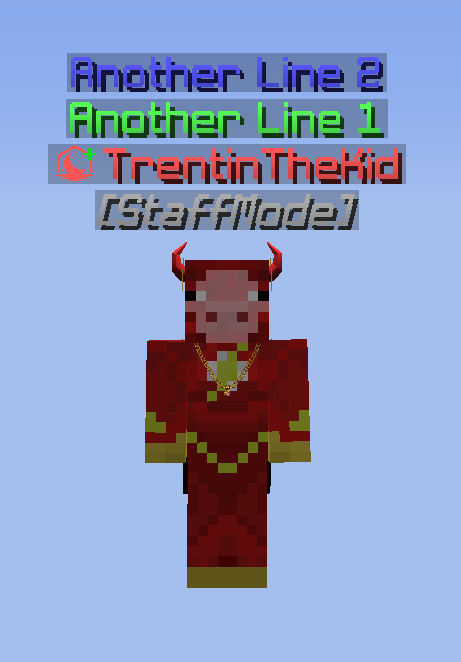
Display an unlimited amount of lines above a users head.
Integration
Sample Code
Explore each integration by cycling through each tab, to find the best fit for your requirements and needs.
Apollo API examples. See General for common patterns and helpers.
Override a Nametag
public void overrideNametagExample(Player target) {
    this.nametagModule.overrideNametag(Recipients.ofEveryone(), target.getUniqueId(), Nametag.builder()
        .lines(Lists.newArrayList(
            Component.text()
                .content("[StaffMode]")
                .decorate(TextDecoration.ITALIC)
                .color(NamedTextColor.GRAY)
                .build(),
            Component.text()
                .content(target.getName())
                .color(NamedTextColor.RED)
                .build()
        ))
        .build()
    );
}
Reset a Nametag
public void resetNametagExample(Player target) {
    this.nametagModule.resetNametag(Recipients.ofEveryone(), target.getUniqueId());
}
Resetting all Nametags
public void resetNametagsExample(Player viewer) {
    Optional<ApolloPlayer> apolloPlayerOpt = Apollo.getPlayerManager().getPlayer(viewer.getUniqueId());
    apolloPlayerOpt.ifPresent(this.nametagModule::resetNametags);
}
overrideNametag Parameters
Recipients recipients- A list of all the player(s) you want to be able to see the updated nametag.
UUID Target- The players UUID you want to override the nametag of.
Nametag- The nametag you want to display for the
targetplayer. It's recommended to use a chat component (opens in a new tab).
- The nametag you want to display for the
Nametag Options
.lines(Component) is using the Adventure Component. See the chat components (opens in a new tab) page for more.
.lines(List.of(
    Component.text()
        .content("[StaffMode]")
        .decorate(TextDecoration.ITALIC)
        .color(NamedTextColor.GRAY)
        .build(),
    Component.text()
        .content(target.getName())
        .color(NamedTextColor.RED)
        .build()
))